Logo format for printing: vector, resolution, files
A practical guide to preparing your logo for printing: vector .ai, .eps or .pdf, CMYK, text converted to outlines, raster files at 300 dpi at actual size.
The right logo format for printing is vector graphics — .ai, .eps or .pdf, in CMYK colours, with text converted to outlines, at actual size (1:1). If a vector file isn't available, raster files (.tif, .png, .jpg) should be at least 300 dpi at the actual print size, or 100–150 dpi at 1:1 for large-format printing. From a single correct file we can produce business cards, a 3-metre banner or a screen printing stencil alike, and we don't have to spend time redrawing your logo.
Why vector is the right choice
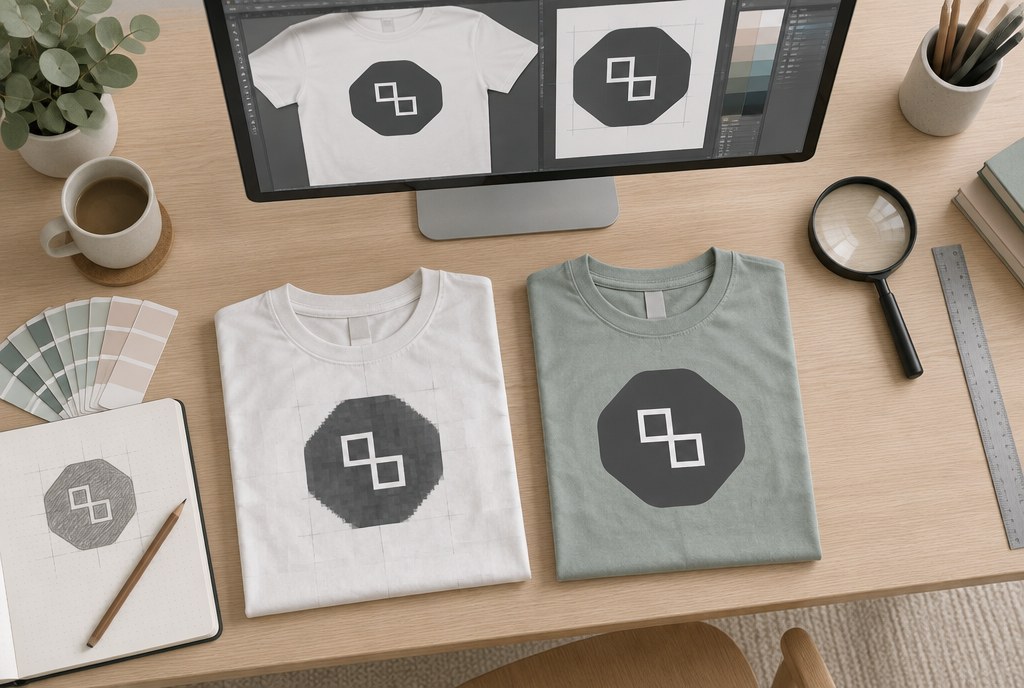
Vector graphics are a mathematical description — lines, curves, colour areas. They can be scaled from 15 mm (a pen clip) up to 3 m (a banner) without any loss of quality. A raster file is a grid of pixels: enlarge it and the pixels become visible, edges turn blurry, and small text becomes unreadable.
The second reason is technology. For contour cutting, screen printing stencils, embroidery digitising and foil printing, a vector path is essential — the machine needs to know the exact outline. A JPG file simply can't provide that unless it's redrawn first.
How to check if your logo is really a vector
- Open the PDF and zoom in to 800%. If the edges stay smooth — it's a vector. If you see little squares — it's raster.
- A file with a .pdf or .eps extension can still contain a simple embedded image. The extension alone doesn't guarantee a vector file.
- A file size of 30–300 KB usually indicates a vector; a 4 MB .pdf with a logo is most likely raster.
File requirements by service
| Product | Preferred format | Minimum resolution | Notes |
|---|---|---|---|
| Business cards, flyers, catalogues | .pdf (vector), CMYK | 300 dpi for raster elements | 2–3 mm bleed, text 3 mm from the edge |
| Stickers with contour cutting | .ai, .eps, .pdf | — | Cut line on a separate layer |
| Posters A3–A0 | .pdf, CMYK | 150–300 dpi at 1:1 | 2 mm bleed |
| PVC banners, roll-up banner stands | .pdf, .tif | 100–150 dpi at 1:1 | For large areas, a 1:10 scale is acceptable |
| Screen printing on garments | .ai, .eps | — | Each colour separately, with Pantone numbers |
| DTF transfer | .pdf, .png with transparent background | 300 dpi at print size | Lines no thinner than 0.8 mm |
| Embroidery | .ai, .eps, .pdf | — | Details under 1.5 mm cannot be embroidered |
| Mugs, pens, thermal mugs | .ai, .eps, .pdf | — | Print area is often 40–60 mm |
Full specifications and sizes for all products are available in the printing services catalogue.
Resolution: 300 dpi only at actual size
The most common mistake is using a logo downloaded from a website at 400×200 pixels. At 300 dpi that only covers 34×17 mm — fine for a business card, but not for an A2 poster. The calculation is simple: divide the pixel count by 300 and multiply by 25.4 to get millimetres.
Large-format printing has lower requirements, since banners are viewed from 2–5 m away: 100–150 dpi at actual size (1:1) is perfectly sufficient. For a photo on a 3×1 m banner, that means roughly 12,000×4,000 pixels — if your file is smaller, it's better to scale it down or rework the layout.
Colours: CMYK, Pantone and white
We print in CMYK. RGB files are converted, and bright blues, oranges and neon shades become more muted — this isn't a printing fault, but a limitation of the colour space. If your brand colour is critical, specify a Pantone number: in screen printing and embroidery we mix the colour to match it exactly, while in digital printing we find the closest possible equivalent.
On dark garments and transparent stickers, white is printed as a separate layer. If your logo is white on a white background in the artwork, it won't be visible — send the file with a grey reference background or mention it in a comment.
If you don't have a vector file
This happens often, especially with older logos or when contact with the original designer has been lost. Here are the options:
- Vector redrawing. A simple logo takes 20–40 minutes; a complex one with fine details can take up to 2 hours. For our regular customers, we usually redraw simple logos free of charge.
- Automatic tracing (Illustrator Image Trace) — only suitable for a clean, high-resolution black-and-white image; the edges come out jagged and still need manual correction afterwards.
- Text reconstruction. If the logo is based on a font, it can be identified and retyped — but the original spacing and letter adjustments need to be recreated manually.
We send the redrawn file in PDF format for approval — it's worth keeping, as it will come in handy for all future orders.
Preparation fees and turnaround times
For most products, preparing artwork from a ready vector file is free. Costs apply where physical stencils or an embroidery program need to be created.
| Item | Preparation, approximate (excl. VAT) |
|---|---|
| Stickers, posters, business cards | EUR 0.00 |
| Catalogues A4/A5, 8 pages | from EUR 15.00 |
| Screen printing, 1 colour, 1 position | from EUR 35.00 |
| Embroidery up to 10,000 stitches | from EUR 25.00 |
| DTF transfer up to A4 | EUR 0.00 |
The screen printing stencil fee is a one-off charge per colour — so for 30 T-shirts, DTF transfer is often more cost-effective (approximately from EUR 6.00/pc, from 20 pcs EUR 5.00), while for 100 T-shirts screen printing at around EUR 1.90/pc works out cheaper. For more on choosing the right technology, see the garment printing section.
Digital printing and stickers are usually ready within 2–5 business days, while garment printing and embroidery take 5–10 business days. The turnaround starts from artwork approval, not from the initial request — so sending the correct file from the start saves 1–2 days. Rush orders are possible by arrangement.
Checklist before sending your file
- Format .ai, .eps or .pdf; text converted to outlines (Create Outlines)
- CMYK colour mode, with Pantone numbers added for brand colours
- Size 1:1 or scale clearly indicated
- Raster elements at 300 dpi (100–150 dpi for large format)
- Bleed of 2–3 mm, important content kept 3 mm from the trim edge
- For stickers — cut line on a separate layer (sticker requirements)
- Files up to 20 MB by e-mail; larger files via WeTransfer or a cloud link
Send your logo to info@attaprint.lv or WhatsApp +371 25776699 — we'll check if the file is suitable and let you know if redrawing is needed. We prepare quotes within one business day.
FAQ
What's the best logo format for printing?
Vector graphics: .ai, .eps or .pdf with CMYK colours and text converted to outlines. A file like this can be printed at any size — from a pen clip to a 3-metre banner — without any loss of quality.
Can I send my logo as a PNG or JPG?
Yes, if the resolution is at least 300 dpi at the actual print size (100–150 dpi at 1:1 for large-format printing). PNG with a transparent background is acceptable for DTF transfers. Raster files aren't suitable for contour cutting, screen printing or embroidery — a vector file is required.
How much does vector redrawing of a logo cost?
For regular customers, we usually redraw simple logos free of charge; more complex ones with fine details can take up to 2 hours of work and are quoted separately. We send the redrawn file for approval in PDF format.
Why does the colour look different in print than on screen?
Screens display RGB, while printing works in CMYK. Bright blues, oranges and neon shades become more muted in CMYK. If your brand colour is critical, specify a Pantone number — it can be matched precisely in screen printing and embroidery.
How much bleed should I leave in the artwork?
For digital printing and posters, 2–3 mm on each side, keeping important text and logos at least 3 mm from the trim line. For stickers with contour cutting, the cut line must be on a separate layer.
How long does an order take after the file is submitted?
Digital printing and stickers usually take 3–5 business days, while garment printing and embroidery take 5–10 business days. The turnaround starts from artwork approval; rush orders are possible by arrangement.